
 LinkedIn outreach
LinkedIn and email, in one sequence.
Ken writes the connection note and every message for each person, and sends them from your rep's own LinkedIn account next to the emails. You approve each one before it goes out.
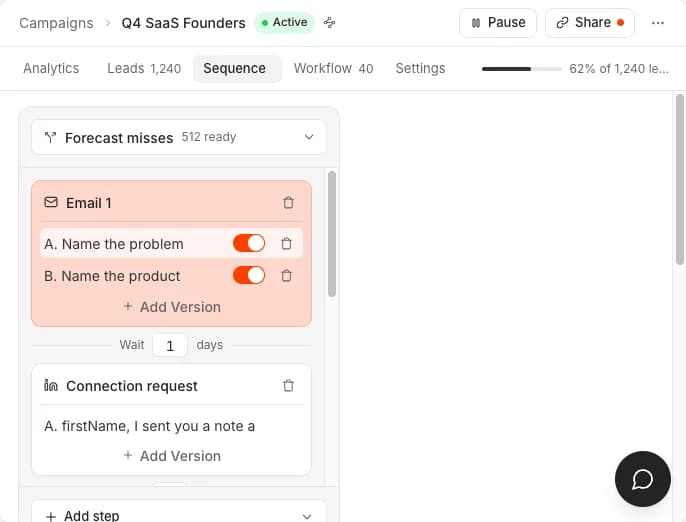
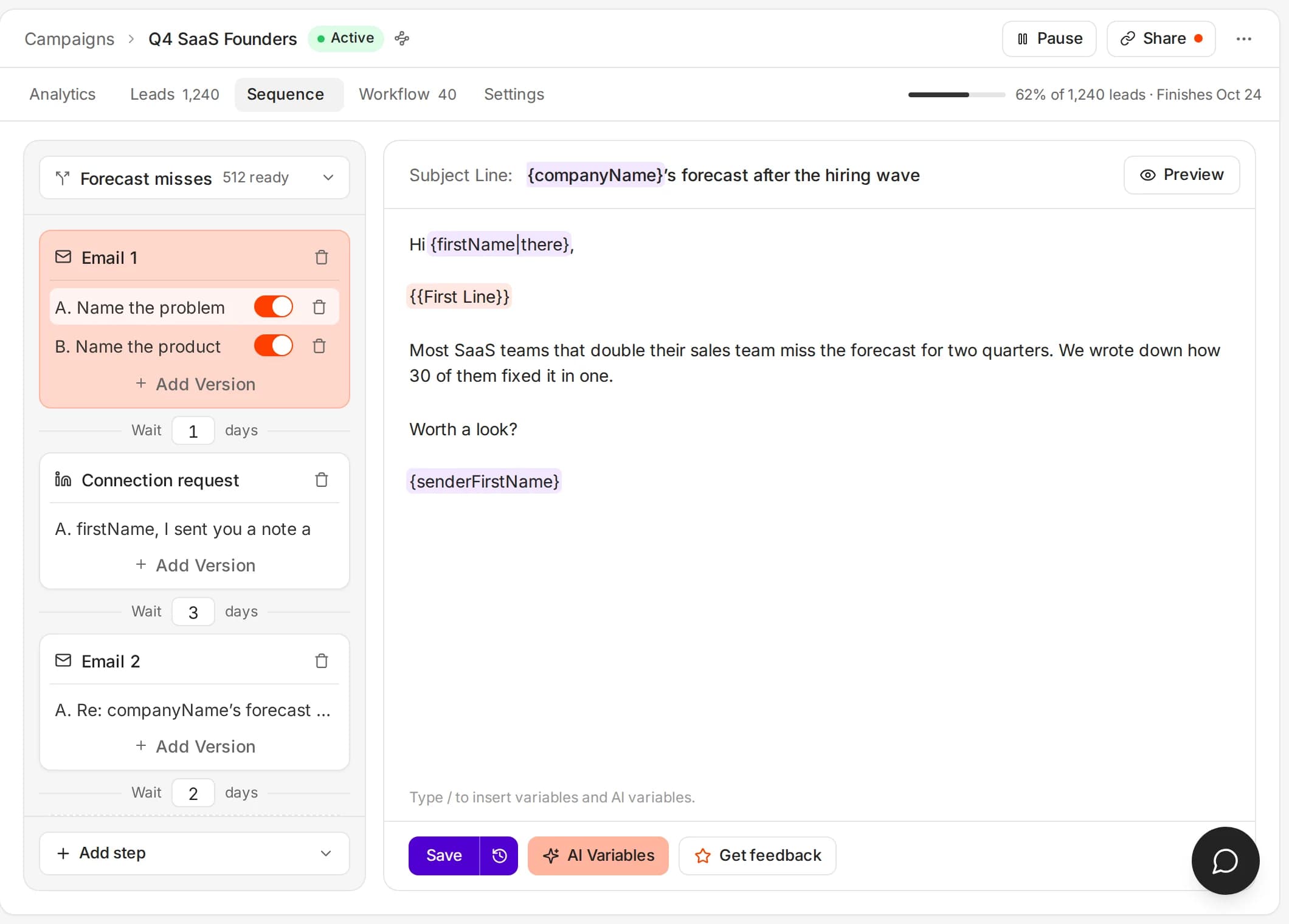
Four LinkedIn steps. One campaign.
LinkedIn steps sit next to email steps. Order them, wait between them, and branch on what the person actually does.

Profile visit
Warm the lead before you connect. A visit can run first, so your name is familiar when the invite lands.
Connection request
A personal note up to LinkedIn's limit, or a clean invite with no note. One connection step per sequence keeps campaigns intentional.

Message
Follow up once they accept. Ken writes variants, tests the opener and keeps the thread in the same campaign as your emails.

InMail fallback
If they have not accepted yet, the first message can go out as InMail - only to open profiles if you choose, so you do not spend paid InMail credits.

Approved before it sends.
Every connection note and message lands in Today next to your emails and call tasks. Approve, edit or snooze it, and Ken sends it from your rep's own account at a safe pace.
- Sent from the rep's own LinkedIn account
- Every note and message approved in Today
- A reply on either channel stops the other

 From Jordan Mills's LinkedIn account
Maya, congrats on the move to Northwind. Dana mentioned forecast reviews are on your list this quarter - happy to compare notes.
- Message after acceptPriya RamanHalcyon Health
- Profile visitTom ReyesVP Sales · Northwind Logistics
Four ways to mix the channels.
Pick a channel policy, then add conditions - clicked, accepted, replied positive - so every lead takes the path that matches what they do.
LinkedIn first, email as backup
Best when your buyers live on LinkedIn and email is the safety net. Ken falls back to email when the LinkedIn path stalls.
- 01Profile visit
- 02Connection request with a note
- 03Wait for accept
- 04LinkedIn message
- 05Email only if they never accept
Email first, LinkedIn to reinforce
Use email for reach, then add LinkedIn for the people who already showed interest - more context, less noise.
- 01Email 1
- 02If opened or clicked → LinkedIn visit and connect
- 03Email 2
- 04LinkedIn message after accept
- 05Stop both channels on any reply
Both channels in parallel
Same campaign, both channels, shared analytics. A reply on either side pauses the rest, so a warm lead never gets two messages.
- 01Email and LinkedIn steps interleaved
- 02Conditions on click, accept or positive reply
- 03One stop rule across both channels
- 04Personalization on every touch
LinkedIn only
Pure LinkedIn when email is the wrong channel, on the same lists, writing and reporting as the rest of Ken.
- 01Visit → connect → message
- 02Optional waits from 0 to 30 days
- 03A/B message variants
- 04No email steps required

The details that make it work.

Conditioned paths
Branch on clicked, accepted or positive reply. Anchor a LinkedIn step before or after a specific email, so the sequence feels designed, not bolted on.

A/B LinkedIn copy
Test up to four message variants on the same step. Profile visits stay single-track; connection notes and messages can split.

Cross-channel stop
An email reply can pause LinkedIn for that lead, and a LinkedIn reply can pause email. One conversation, not two bots talking over each other.

Same writing
Personalization, qualification and quality checks work across both channels - one approval queue, one voice.
Safe daily caps
Per account, Ken keeps to LinkedIn-safe limits: 20 connection requests and 50 messages per day (profile visits up to 80). Accounts stay healthy as volume grows.

Lists, CRM and MCP
The same leads as your email outbound. Activity syncs to your CRM, and your AI agent can run it over MCP.
Multichannel without stitching tools.
Most teams run Instantly or Smartlead for email and add a separate LinkedIn tool. Ken runs both channels on one list, one sequence and one inbox, whether your team runs it or ours does.

One campaign
Email, connection request, message and profile visit on the same sequence timeline.

One source of truth
Shared contacts, enrichment and analytics - no list hygiene across two vendors.
One inbox
Answer positive replies without jumping between LinkedIn and a cold email inbox.
On Ken AI, each connected LinkedIn account is 1,500 credits ($30) a month, and users and workspaces are unlimited. Plan details are on the pricing page. See pricing · All features
Frequently Asked Questions
Actions, approvals, limits and billing.
Profile visits, connection requests (with or without a note), and messages after accept. The first message can fall back to InMail when they have not accepted yet - optionally only to open profiles.
You do. Every connection note and message waits in Today next to your emails until you approve or edit it. Ken then sends it from your rep's own LinkedIn account.
Yes. Ken interleaves the steps, or follows a channel policy you pick: LinkedIn only, LinkedIn first with email as backup, email first with LinkedIn to reinforce, or both in parallel.
LinkedIn steps can wait on signals like an accepted connection, a clicked email or a positive reply. You can also anchor a LinkedIn step before or after a specific email step, so the timing stays deliberate.
Per connected account: up to 20 connection requests and 50 messages per day, with profile visits up to 80. Ken enforces these so accounts stay within LinkedIn's safety norms.
Yes. An email reply can pause the remaining LinkedIn steps for that lead, and a LinkedIn reply can pause email, so nobody who already answered gets another message.
On Ken AI, each connected LinkedIn account is 1,500 credits ($30) a month, and users and workspaces are unlimited. Ken does not charge per LinkedIn action. Details are on the pricing page.
Put LinkedIn next to your email.
Start free with 1,000 credits. No card. On Ken AI, each connected LinkedIn account is 1,500 credits ($30) a month.