

Google Workspace vs Microsoft 365 vs Private SMTP for Cold Email
Send from the provider your prospect uses, 2-3 inboxes per domain. In our data, crowded Microsoft domains got 13x the blocks of Google inboxes at Gmail.
Cristian Frunze · Oct 25, 2026 · 13 min read
- google workspace vs microsoft 365 for cold email
- private smtp for cold email
- cold email infrastructure
- cold email inbox cost
- inboxes per domain
- cold email deliverability

Over the past year, 52% of the prospects we emailed had company mail on Microsoft. Another 36% were on Google. So whichever inbox you send from, a third to half of your list reads mail at the other company.
Send from both Google Workspace and Microsoft 365 inboxes, two or three per domain, and email each prospect from the provider their company uses.
The price per inbox barely matters. Private SMTP only makes sense when someone on your team runs servers, IPs and bounce handling every day.
Most comparisons stop at price and limits. We had something better. From May to August 2026, some of our campaigns sent from Google and Microsoft inboxes side by side, to the same audience, with the same email. Two things mattered more than the platform itself:
- Where your prospect reads mail. At prospects whose company mail runs on Google, our Google inboxes were blocked about 1/13 as often as Microsoft inboxes on crowded domains. They also got almost 5 times the human replies. At prospects on Microsoft, that edge was gone.
- How many inboxes share one domain. At those same Google-hosted prospects, Microsoft domains carrying 21 or more inboxes were blocked about 4 times as often as Microsoft domains carrying 1 to 5.
If you keep one line, keep this one. The inbox you buy matters less than where your prospect reads mail and how many inboxes you pile onto one domain.
What does each option cost at 10, 30 and 100 inboxes?
Inboxes are cheap. Here's what public price lists showed on October 8, 2026. Totals add $14 domains at 3 inboxes per domain.
| Setup | Per inbox, monthly | 10 inboxes | 30 inboxes | 100 inboxes |
|---|---|---|---|---|
| Google Business Starter, direct, annual plan | $7.00 | $75 | $222 | $740 |
| Microsoft Exchange Online Plan 1, direct, yearly | $4.00 | $45 | $132 | $440 |
| Google via a reseller, Zapmail | $2.99 to $3.90 | $44 | $111 | $339 |
| Microsoft via a reseller, InboxKit | $3.00 | $35 | $102 | $340 |
| Shared-IP SMTP inboxes, Mailforge, 10 minimum | $3.00 | $35 | $102 | $340 |
| SMTP inboxes plus one dedicated IP, Infraforge | $4.00, plus $99 per IP | $144 | $231 | $539 |
| Microsoft "Azure" tenant with up to 100 inboxes, InboxKit | $30 per tenant | $31 | $31 | $31 |
Exchange Online Plan 1 is Microsoft's mail-only license, and it's all you need for sending. Google gives new customers $5.60 per user for the first 12 months, on up to 20 users.
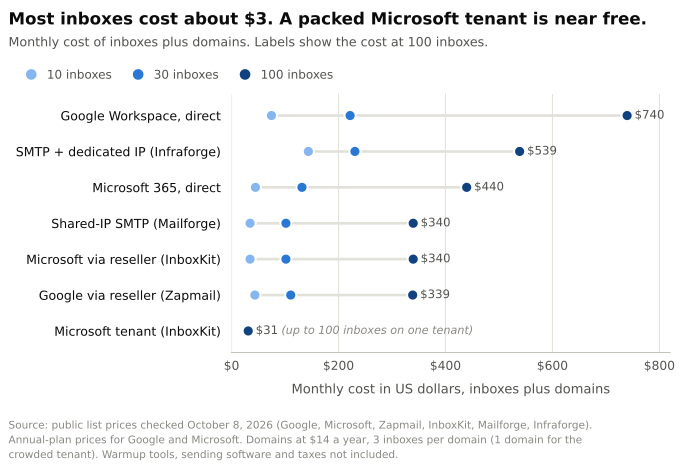 Source: public list prices from Google, Microsoft, Zapmail, InboxKit, Mailforge and Infraforge, checked October 8, 2026. Domains at $14 a year, 3 inboxes per domain.
Per email, the gap shrinks to almost nothing. Say you run 30 inboxes and each sends 30 cold emails every weekday. That's about 20,000 emails a month. Retail Google works out to about 1.1 cents per email. A $3 reseller inbox is about half a cent. Neither number will decide whether your campaign works.
The one setup that costs almost nothing packs up to 100 inboxes into one Microsoft tenant. Put them all on one domain and you've built the crowded setup our data has the most to say about.
What are the sending limits on each?
Google and Microsoft both publish daily caps. We checked them in October 2026. For cold email, neither cap is the real limit.
| Google Workspace | Microsoft 365 | Your own SMTP | |
|---|---|---|---|
| Cap per inbox | 2,000 messages a day, per Google | 10,000 recipients a day and 30 messages a minute, per Microsoft | No provider cap |
| Cap per account | None published | About 12,000 outside recipients a day across 10 licenses, by Microsoft's formula | Set by your IPs' reputation |
| New accounts | 500 messages a day on a trial. Higher limits kick in up to 75 days after your domain has paid Google $100 in total | A change rolling out through November 2026, notice MC1454397, cuts trial tenants to 500 outside recipients a day. New tenants get 10% of the normal limit for 30 days, then 25% until day 60 | New IPs start with zero reputation |
| Who can switch you off | Google. Its acceptable use policy bans "unsolicited mass email" | Microsoft. Its acceptable use policy bans "unsolicited bulk or unsolicited commercial e-mail" | Your hosting company, and blocklists like Spamhaus |
Read the last row first. Neither company wants cold email on its platform. Microsoft even says customers "who need to send legitimate bulk commercial email" should use "third-party providers that specialize in these services." Cold email from these inboxes runs on their tolerance, so keep it low, steady and clean.
In practice, reputation stops you long before 2,000 a day. ScaledMail, for one, advises 15 to 25 cold emails per inbox per day, and you add inboxes to grow. Our guide to how many cold emails you can send per day covers that math.
One Microsoft date to plan around. Per notice MC786329, Microsoft will switch off SMTP sign-in with a plain password by default at the end of December 2026. Connect Microsoft inboxes to your sending tool with OAuth instead, the "Sign in with Microsoft" style of login.
Which one actually lands in the inbox?
The common advice is to match providers. Email Google-hosted prospects from Google and Microsoft-hosted prospects from Microsoft. Few people show data for it, so we checked ours. From here on, "Gmail" means a prospect whose company mail runs on Google Workspace, and "Outlook" means one on Microsoft 365.
First, the prospects. We looked at everyone we emailed from October 2025 to October 2026, across 18 workspaces, counting each prospect once per campaign. 52% were on Outlook and 36% on Gmail.
Some campaigns sent from more than one kind of inbox at once. That's close to a fair test. Inside one campaign, and even inside one audience split with its own email copy, the only thing that changed was the sending inbox. We compared two things: how often the prospect's mail server blocked the email outright, and how often a person wrote back. A human reply means a real person, not an out-of-office bot.
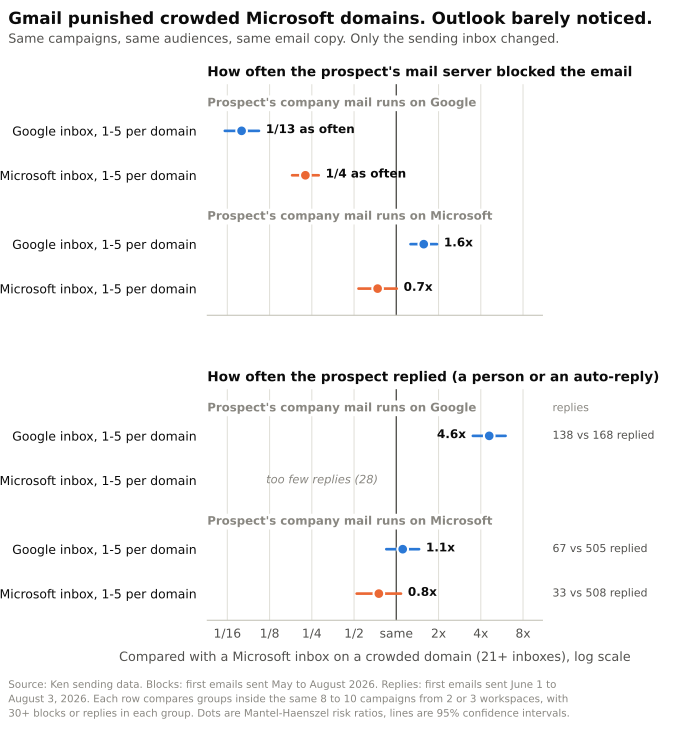 Source: Ken sending data. Blocks: first emails sent May to August 2026. Replies: first emails sent June 1 to August 3, 2026, counting auto-replies because some rows had too few human replies. Each row compares groups inside the same 8 to 10 campaigns from 2 or 3 workspaces, with 30+ blocks or replies in each group. Lines show 95% confidence intervals.
At Gmail, Google inboxes won by a mile. We compared them with Microsoft inboxes on crowded domains, meaning 21 or more inboxes per domain. Google inboxes were blocked about 1/13 as often. They got 4.8 times the human replies, and the 95% confidence range runs from 2.8 to 8.4 times. Google had fewer blocks in all 9 campaigns we could compare, from 3 workspaces, and more human replies in 8 of 9. We also split it finer, into 42 audience splits that each had their own email sequence. Google had fewer blocks in 41 of them and tied in the last.
At Outlook, the edge disappeared. Counting every reply, auto-replies included, Google inboxes got 1.1 times as many, a gap too small to tell from chance. There were too few human replies on this side to compare. And Google inboxes were blocked 1.6 times as often as those same crowded Microsoft inboxes.
Crowding hurt mostly at Gmail. At Gmail prospects, Microsoft domains with 1 to 5 inboxes were blocked about 1/4 as often as Microsoft domains with 21 or more, in 7 of 8 campaigns. At Outlook prospects, the gap was small and not clearly real.
Put those together and the 13x gap at Gmail looks like two effects stacked. Crowding accounts for about 4x. The platform accounts for roughly another 4x, because Google inboxes were still blocked about a quarter as often as inboxes on light Microsoft domains. That second number is shakier. It rests on 6 campaigns from 2 workspaces and didn't hold in every one.
So "Google beats Microsoft" is half true. At Gmail, both moves paid off, sending from Google and keeping domains light. At Outlook, Google inboxes got blocked more, and light domains made no clear difference.
What this data can't tell you:
- It's one summer. From June to August 2026, Gmail blocked far more cold mail than usual, and that wave drives many of these block numbers. By September, hard-bounce rates at Gmail and Outlook prospects were level.
- It's a few teams. Each comparison rests on 2 or 3 workspaces. Google inboxes sent the first email to fewer than 1 in 10 of our prospects.
- A block isn't the whole story. Mail that gets accepted and then filed in junk never shows up as a block. Replies fill part of that gap. Gmail doesn't send vacation replies to mail in spam, so even an out-of-office reply from a Gmail prospect means the email got past the spam folder.
- Custom SMTP failed our fairness check. A sending server can't change whether an address exists, so every kind of inbox should log about the same share of dead-address bounces. Google and Microsoft came out close, within 1.1 to 1.4 times, and replies, which don't rely on bounce records, point the same way. Custom SMTP inboxes logged less than half the dead-address bounces of Microsoft inboxes, even inside the same audience split. Something in how those bounces got recorded is off, so we didn't score SMTP. That's not a verdict on SMTP. It's a lesson about running it.
Why do crowded domains get blocked more?
Crowding isn't a rare edge case. In our sending, it was the normal way Microsoft inboxes were set up. Across 144 of our sending domains, the typical Microsoft domain carried 50 inboxes and the typical Google domain carried 3. In 12 of the 13 workspaces that sent from Microsoft, the typical domain held 39 to 52 inboxes. All 7 workspaces on Google held 3.
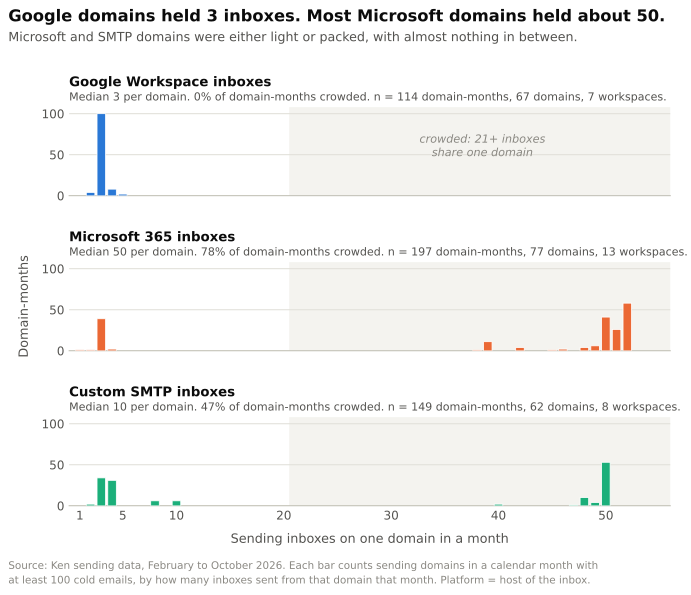 Source: Ken sending data, February to October 2026. Each bar counts sending domains in a month with at least 100 cold emails, by how many inboxes sent from them. n = 114 Google, 197 Microsoft and 149 custom SMTP domain-months, from 67, 77 and 62 domains.
Here's the odd part. On crowded Microsoft domains, each inbox sent less than a third as much mail as a typical Google inbox. But with about 50 of them on one domain, each crowded domain pushed about 4.6 times as much mail per month as a Google domain. Light Microsoft domains looked just like Google ones on both counts. That fits a filter that judges the whole domain, not each inbox. Fifty quiet inboxes add up to one loud domain.
So adding inboxes to a domain doesn't spread the risk. It stacks it.
What does running your own SMTP really take?
"Private SMTP" means two different things, and the term gets used for both.
The first is renting SMTP inboxes from a provider like Mailforge or Infraforge. You get cheap inboxes, and someone else runs the servers. Your reputation depends on their shared IP pool, or on a dedicated IP you pay for.
The second is running your own mail servers. We do that, alongside Google and Microsoft inboxes. Ken runs cold email and LinkedIn outreach for B2B companies, done for you, on infrastructure we own. That means our own SMTP servers, dedicated US and EU IPs, private warmup and live monitoring. Here's what it takes.
- Servers that are allowed to send. Port 25 is the door mail servers use to talk to each other, and most clouds close it. AWS blocks it until you ask. Google Cloud, Azure and DigitalOcean block it on most accounts.
- No shortcuts through email APIs. Amazon's acceptable use policy bans "unsolicited mass email." Twilio SendGrid's email policy bans purchased lists and requires opt-in consent. SES and SendGrid can't be your cold email server.
- DNS records that prove who you are. SPF lists the servers allowed to send for your domain. DKIM adds a signature that proves an email really came from your domain. DMARC tells inboxes what to do when those checks fail. Google also requires a reverse DNS record on every sending IP.
- Slow IP warmup. A new IP has no history, so it starts small and grows only while bounces and complaints stay low. Our post on dedicated vs shared IPs covers how much volume keeps an IP warm.
- Bounce and complaint handling. Your system has to catch every rejected email, read why it bounced, and stop sending to that address. Our own SMTP numbers above show how easily the bounce records drift.
- Someone watching every day. Blocklists, inbox placement, server health. When something breaks at 2 a.m., it's yours.
Owning SMTP pays off at volume, with a team behind it. For a founder sending a few hundred emails a day, it's a distraction from the list and the copy.
So which should you pick?
Start from your list, not the price table. Look up each prospect's MX record, the public DNS entry that says where a company's mail goes. Anything ending in google.com is Google. Anything ending in mail.protection.outlook.com is Microsoft. Filters like Proofpoint or Mimecast can hide the provider behind them.
| Your situation | What I'd do |
|---|---|
| Most of your list is on Google | Google Workspace inboxes, 2 or 3 per domain |
| Most of your list is on Microsoft | Microsoft 365 inboxes, 2 or 3 per domain. Don't expect Google inboxes to help here |
| Your list is mixed | Run both, and send Google-hosted prospects from Google inboxes |
| A vendor offers up to 100 inboxes on one tenant for $30 | Spread them across 30 or more domains, 2 or 3 each, for about $40 a month in domain fees. In our data, crowded domains got about 4 times the blocks at Gmail prospects |
| You send a few hundred emails a day | Skip SMTP. Buy Google or Microsoft inboxes direct or from a reseller |
| You send at real volume and have an ops person | Owned SMTP or dedicated IPs, plus Google and Microsoft inboxes for matching |
Whatever you pick, warm new inboxes up for 2 to 4 weeks before real sending. Our warmup guide walks through it.
Frequently asked questions
Is Microsoft 365 cheaper than Google Workspace for cold email?
Bought direct, yes. Exchange Online Plan 1 is $4 per inbox per month on a yearly plan, against $7 for Google Business Starter. From resellers, both cost about $3.
Does sending from Google to Gmail really help?
In our data, yes. At Google-hosted prospects, Google inboxes were blocked about 1/13 as often and got almost 5 times the human replies of Microsoft inboxes on crowded domains. At Microsoft-hosted prospects, they had no reply edge and got blocked more.
How many inboxes should I put on one domain?
Two or three. ScaledMail advises 2 for Google Workspace and 2 to 3 for a standard Microsoft tenant. In our data, Microsoft domains with 21 or more inboxes were blocked about 4 times as often at Google-hosted prospects as domains with 1 to 5.
Can I use SendGrid or Amazon SES for cold email?
No. Both providers' policies rule out unsolicited mail, and cold email through them risks your account.
Is private SMTP better for deliverability than Google or Microsoft?
Not by itself. You control IPs and volume, and there's no Google or Microsoft account to lose. But new IPs start with no reputation, and every bounce, block and blocklist becomes your job.
The short version
Pick inboxes by where your prospects read mail, keep two or three per domain, and stop trying to save a dollar per inbox. The crowded, cheap setup is the one Gmail punished hardest in our data. If you'd rather not build any of this, your first campaign with us is free.