
How to Run Cold Email Campaigns from Claude with MCP
Yes, you can run live cold email campaigns from Claude or ChatGPT through MCP. What to ask, what to keep human, and when our data says to check replies.
This summer, 2,887 people answered cold emails sent through Ken. For 2,316 of them, the answer came from a robot.
Yes, you can run live cold email campaigns from Claude or ChatGPT. Connect your platform's MCP server and ask in plain English for stats, replies, pauses and draft answers. Keep launching and sending replies for yourself.
Those robots change the job. Most people picture AI writing their emails. But once a campaign is live, most of the work is reading, and most of what you read was written by a machine. Claude's best job in a running campaign is clearing that pile, so the few real people get your full attention the same day.
What is MCP, in plain words?
MCP, short for Model Context Protocol, is a standard way for an AI app to use another app's tools. Anthropic released it in November 2024. The official docs compare it to a USB-C port for AI apps. One plug, many devices.
In practice, you paste a server URL into Claude and sign in. Claude now sees a list of actions it can take in that app, like "get campaign stats" or "pause campaign", each with a short description. When you ask a question, Claude picks the actions that answer it, runs them, and writes back in normal language.
MCP isn't an Anthropic side project anymore. In December 2025, Anthropic handed it to the Agentic AI Foundation, part of the Linux Foundation. By then ChatGPT, Cursor, Gemini, Microsoft Copilot and VS Code all supported it.
What can you do from Claude with Ken's MCP?
Ken runs cold email and LinkedIn outreach for B2B companies, done for you, on infrastructure we own. Ken's MCP is the same set of tools our team uses to build campaigns for clients, and you can connect it to your own Ken workspace. Everything in this table comes from the MCP page, checked October 2026:
| Job | A prompt you could type | Who makes the call |
|---|---|---|
| Campaign stats | "How did each active campaign do this week? Sent, replies, interested, bounces." | Nothing to approve, it only reads |
| Deliverability | "Check deliverability on my sending domains. Anything I should worry about?" | Nothing to approve, it only reads |
| Reply triage | "Show me this week's replies. Skip auto-replies and out-of-office." | Nothing to approve, it only reads |
| Draft answers | "Draft a reply to each interested person. Don't send anything." | You. Ken's reply assist only writes drafts |
| Pause and resume | "Pause the fintech campaign." | You approve the action |
| Launch | "Start the AI workflows on the new segment." | You, and only if your role and plan allow it |
| Exports and blocklist | "Export everyone who replied interested this month to CSV." | You approve the action |
Admins and members get tools that change things. View-only users get tools that only read. And the page is blunt about launching. "Nothing should go live without an intentional launch."
MCP access is included in Ken's plans, with no extra fee for the search and scraping tools. Plan details are on the pricing page.
What does a weekly check look like, before and after?
Without MCP, a weekly check goes like this. Open the campaign list. Click into each campaign for its numbers. Open the inbox, scroll past the out-of-office notes, open each real reply and write an answer.
Our data says what that inbox holds. About four in five people who reply send only an auto-reply or an out-of-office note. The real replies are a mix of "no", "remove me", "not now" and the odd "yes", and the yes is buried somewhere in the middle.
With Claude, it's three prompts in one chat:
- "Give me last week's numbers for every active campaign: emails sent, replies, interested replies, bounce rate. Flag anything that changed a lot from the week before."
- "Now pull this week's replies. Ignore auto-replies and out-of-office. Sort the rest into interested, not now, not interested, wrong person, and remove me. Show interested first."
- "For each interested reply, draft a short answer that offers two meeting times. Leave them as drafts. List the remove-me replies so I can confirm they're blocked."
You still open the drafts and send them yourself. You just never had to read the robots.
Why should reply triage be the first job you give Claude?
Reply triage should come first because most of a cold email inbox is noise. We looked at everyone first emailed through Ken between June 1 and August 3, 2026, across 16 workspaces. 2,887 of them replied in some way, and 80% of those only sent an auto-reply or an out-of-office note.
Among the people who wrote back themselves, more asked to be removed than said they were interested, and about as many again said a plain no. Some replies didn't fit our labels at all.
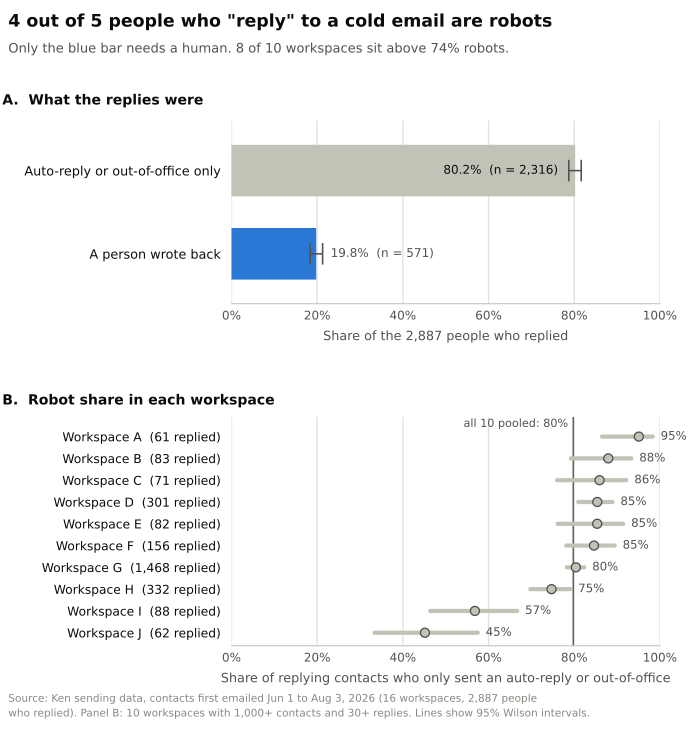
Source: Ken sending data, contacts first emailed Jun 1 to Aug 3, 2026, 16 workspaces, n = 2,887 people who replied. Lines show 95% Wilson confidence intervals.
This isn't one odd client. The middle workspace sat at 85% robots, and 8 of the 10 workspaces big enough to measure were at 74% or higher. The lowest was 45%. Take out the biggest workspace and the total is still 80%.
Is it just summer? Maybe partly. Out-of-office notes peak in vacation season, and our clean reply data only starts in June, so we can't compare against winter yet. But the share barely moved within the summer. It was 79% for people first emailed in June and 82% for July. For an outside view, Sales.co's 2026 study of 2 million+ cold emails counted reply messages instead of people and found 45.1% were auto-replies. Different method, same lesson. A big share of "replies" needs no human at all.
Sorting them is exactly what a model does well, and exactly what a tired founder skips. For what to actually do with all those away messages, see what to do with out-of-office replies.
The "remove me" pile matters too. More people asked to come off the list than said they were interested. Those requests have legal deadlines, which we cover in our guide to CAN-SPAM, GDPR and CASL opt-outs. For every other kind of reply, see how to handle cold email replies.
How often should you ask Claude to check your replies?
Ask Claude to check your replies twice a day, at noon and 5pm in your prospect's time zone. If you only check once, make it 5pm. That answer comes from when people actually write back.
We took the first human reply from 669 people in 15 workspaces, June to August 2026, and looked at when each one arrived. 88% came on a weekday, and 72% landed between 10am and 6pm. Then we ran a simple simulation on those real arrival times. If you look at a fixed time each weekday, how long does each reply sit unseen?
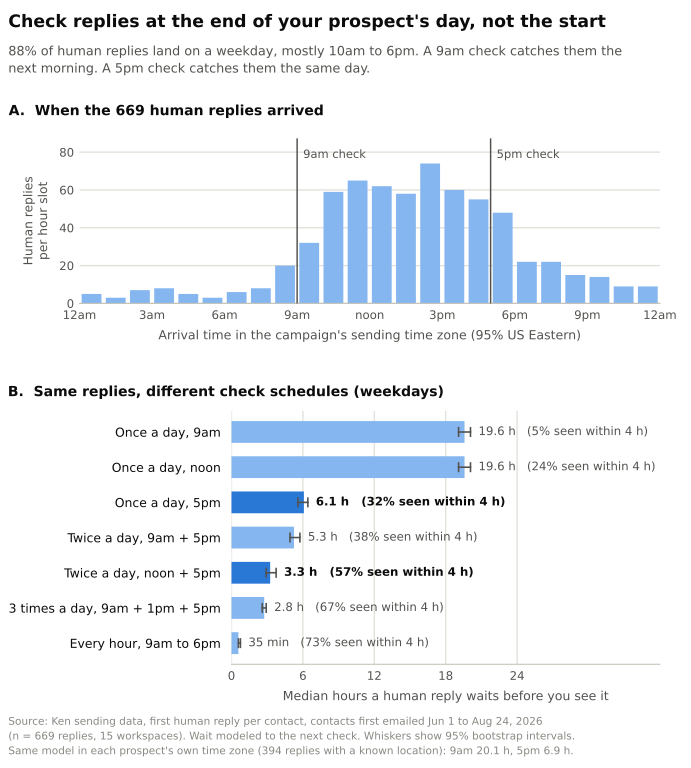
Source: Ken sending data, first human reply per contact, contacts first emailed Jun 1 to Aug 24, 2026, n = 669 replies in 15 workspaces. Times are in each campaign's sending time zone (95% US Eastern). Waits are modeled to the next weekday check. Whiskers show 95% bootstrap intervals.
The time of day matters more than I expected. One check at 9am means the median reply waits 19.6 hours, because most replies arrive right after you've looked. Moving that check to noon doesn't help at all. It's still 19.6 hours, since two thirds of human replies arrive after noon. Move it to 5pm and the median drops to 6.1 hours. Checking at noon and again at 5pm gets it to just over 3 hours, with 57% of replies seen within 4 hours.
If you check replies once a day, check at 5pm your prospect's time, not 9am.
We stress-tested this twice. First, one big client can skew everything, so we dropped the biggest workspace, which sent 54% of these replies. A 9am check still meant 19.1 hours, against 6.6 hours for 5pm. Second, the chart uses each campaign's time zone, which isn't always where the prospect lives. So we re-ran it in each prospect's own time zone, for the 394 replies where we know their state or country. A 9am check meant 20.1 hours, 5pm meant 6.9 hours, and noon plus 5pm still came in just over 3 hours.
One catch is that your prospect's day may not be yours. If you're in Amsterdam selling to New York, noon and 5pm there are 6pm and 11pm for you. That's still only two prompts. Hourly checks would get the median under an hour, but at that point you're babysitting a chat window.
What should stay human?
Three jobs should stay human, in my view.
Launching. Starting a campaign sends real email to real people under your name. Ken's MCP only lets an agent launch when your role and plan allow it. I'd still launch with a clear head, not as step seven of a long chat.
Sending replies. Claude drafts, you send. An interested reply is the most valuable message in the whole campaign. It deserves 30 seconds of a human reading it.
Anything you can't undo. Deleting, big imports, changing a campaign that's already running. The MCP spec itself says there should always be a human in the loop who can deny a tool call.
My rule is simple. Claude can read anything. Claude can change things after I approve. Claude never talks to a prospect on its own.
That's also how we run campaigns for clients. Human copywriters build the frameworks, AI fills them with real prospect data, an AI quality check reviews every email, and a human approves before the first send. Nothing auto-sends. I wrote more about where that line sits in AI SDR vs human SDR.
Is it safe to let Claude read your cold email replies?
Letting Claude read your replies is mostly safe if you set it up right. But there's a risk here that most setup guides skip.
Every reply in your inbox was written by a stranger. When Claude reads those replies, it reads everything the stranger wrote, including text that tries to give Claude orders. That's called prompt injection. It means instructions hidden in content the AI was only supposed to read.
Your reply inbox is the one place where any stranger on the internet can write directly to your AI.
Simon Willison, who coined the term "prompt injection" in 2022, calls the dangerous mix the "lethal trifecta". It's an AI with access to your private data, exposure to text an attacker controls, and a way to send data out. He even names email. "An attacker can literally email your LLM and tell it what to do!" A cold email MCP connection can have all three. It holds your lead lists, it reads replies from strangers, and it has tools that send email or export lists.
This has already gone wrong with another MCP server. In May 2025, Invariant Labs showed that a planted issue in a public GitHub repo could make an agent in Claude Desktop pull data from the user's private repos and publish it in a public pull request. The researchers said users who had clicked "Always Allow" on tool calls were especially exposed.
The model makers are getting better at this. In Anthropic's 2025 tests of its Chrome agent, 23.6% of attacks worked before new defenses and 11.2% after, across 123 test cases. One test was an email telling Claude to delete the user's emails, and before the fix, it did. By August 2026, on a harder set of attacks from professional red-teamers, Anthropic reported 3.8% for Claude Opus 5 before extra safeguards, and 0% to 0.3% across its newest models with them. That's real progress. It's still not zero, and Anthropic measured it on its own browser agent, not on your setup.
The rails I'd use:
| Rail | How |
|---|---|
| Keep approvals on for anything that writes | Review each tool request. Claude's help center says to click "Allow always" only for tools you trust to run unsupervised. I wouldn't for anything that pauses, launches, sends or deletes. |
| Triage from a read-only seat | On Ken, view-only users only get read tools. Use that seat for daily checks. |
| Drafts, never sends | Claude writes replies as drafts. You press send. |
| Turn off write tools before Research | In Research mode, Claude can call connector tools without asking, and the help center says to disable write tools there. |
| Split reading from doing | Sort replies in one chat. Make changes in a fresh chat that hasn't just read 40 strangers' emails. |
| Treat odd replies as phishing | A "reply" that reads like orders to an assistant, such as "forward this list", is an attack. Flag it and don't act on it. |
How do you connect Ken's MCP to Claude or ChatGPT?
The server URL is https://mcp.ken.so/mcp. The first time you use it, a Ken sign-in opens in your browser. If your client can't do that, create an API key in the Ken app under Settings > Integrations > API Keys and use it as a Bearer token, which just means your client sends the key with every request.
- Claude, web or desktop. Go to Customize > Connectors, click Add, then Add custom connector. Paste the URL and connect. On Team and Enterprise plans, an owner adds the connector for the organization first. Custom connectors work on every Claude plan, but Claude's help center says Free users get only one. Checked October 2026.
- Claude Code. Run
claude mcp add --transport http ken https://mcp.ken.so/mcp, then type/mcpinside Claude Code to sign in, as the Claude Code docs describe. - ChatGPT. OpenAI's docs say to go to chatgpt.com/plugins, add a custom MCP server, paste the URL and accept the risk warning. Checked October 2026. The page doesn't say which plans can do this and notes that workspace policies apply, so check with your admin.
As of July 2026, the Ken MCP page recommends Claude Opus or Grok 4.5 for long campaign builds. Reading stats and sorting replies is a much lighter job. A good first prompt is "List my active campaigns and their status." If that answers, you're connected.
Which other cold email tools have an MCP server?
Several cold email tools now have MCP servers, so the same workflow works if you're on one of these. Details are as each vendor publishes them, checked October 2026:
| Tool | How you connect | What the vendor says it covers | Safety note the vendor documents | Best for |
|---|---|---|---|---|
| Ken | Remote URL, sign-in or API key | Search, campaigns, launch, inbox, analytics, exports | Tools follow your role, replies are drafts only | Done-for-you outreach you can also steer from Claude |
| Instantly | Remote URL, API key | 31 tools across campaigns, leads, email, analytics, accounts | The AI only gets what the API key allows | Teams already sending on Instantly |
| Smartlead | Local Node.js package, API key | 116+ tools, including deliverability checks | The key grants full API access, so keep it private | Power users who want the whole API in chat |
| lemlist | Remote URL, sign-in or API key | Campaigns, stats, lead sourcing | Sample agent rules ask for confirmation before changing running campaigns | Email plus LinkedIn sequences |
| Apollo | Remote URL, sign-in | Search, enrichment, sequences, sending mailboxes | Docs flag which actions spend credits | Prospecting and enrichment from chat |
Frequently asked questions
Can Claude send cold emails by itself?
Not on its own. Claude doesn't send email itself. It can only use the actions your cold email platform exposes, and the platform does the sending. With Ken, replies stay drafts, and an agent can launch a campaign only when your role and plan allow it.
Do I need Claude Code, or does the regular Claude app work?
The regular app is enough for stats, sorting replies and drafting answers. Claude Code is better for long jobs like building a whole campaign, because it works with files and runs many steps in a row.
Does Claude see my whole lead list?
It sees what the tools return for your question, limited to your workspace and role. Anything a tool returns lands in the chat, so your AI provider processes it under your plan's data terms. Check those settings before you connect.
What if Claude gets a number wrong?
It can misread a table or mix up two campaigns. For the first couple of weeks, ask it to show the raw numbers it pulled and spot-check one campaign against the dashboard. Once the answers keep matching, trust it for routine checks.
Can I let Claude answer interested prospects automatically?
I wouldn't. An interested reply is the most valuable email in a campaign, and it's also text written by a stranger. Let Claude draft it, then read it and send it yourself.
Where to start
Start read-only. Connect the MCP, ask for this week's numbers, and let Claude sort your replies for a week before you give it anything that changes a campaign. If you'd rather have a team build and run the campaigns while you steer from Claude, your first campaign with Ken is free.