

Why Cold Emails Land in Outlook Junk but Not Gmail
Microsoft 365 rarely bounces cold email, yet its users had 42% lower odds of a human reply than Google's in our campaigns. Why, and how to fix it.
Cristian Frunze · Oct 20, 2026 · 12 min read
- cold emails going to junk in outlook but not gmail
- outlook junk folder cold email
- microsoft 365 spam filter
- bulk complaint level
- email headers
- cold email deliverability

Out-of-office bots at Microsoft 365 companies answered our cold emails about as often as the bots at Google Workspace companies. The people at those Microsoft companies wrote back about 40% less.
Cold emails land in Outlook junk but not Gmail because Microsoft runs its own filter. It keeps its own record of your sending servers, gives you its own "bulk" score, and lets each company choose how strict to be, often with a second filter like Proofpoint in front. Passing Gmail proves nothing at Microsoft. Test on a real Microsoft 365 mailbox, read the headers, and fix what they name.
Most guides stop at "set up SPF, DKIM and DMARC," the DNS records that prove an email really came from your domain. They miss four things:
- The 2025 Outlook rules are about personal inboxes. So is SNDS, the Microsoft dashboard most guides send you to. Your prospects are on Microsoft 365, under company rules.
- Microsoft rarely says no out loud. In the same campaigns, Microsoft 365 prospects bounced us less, their auto-replies came back just as often, and a person wrote back about 40% less often.
- Big buyers add a second filter. Half of the 5,000+ employee company domains we emailed run mail through a security gateway first.
- Microsoft can change its mind. It re-checks unread mail for 48 hours and can quietly move it to Junk.
Microsoft 365 tends to accept cold email and file it where nobody reads it, so a low bounce rate on Outlook prospects is no proof that anyone saw your email.
Why does Outlook treat cold email differently from Gmail?
Google and Microsoft each keep their own reputation for your domains and servers, so doing well at one doesn't carry over.
Microsoft checks mail in layers. First, it "rejects spam based on the reputation of the source email server" (Microsoft, checked October 2026). Then come a spam check and a separate bulk check.
Cold email at volume looks a lot like bulk mail, so the bulk check matters most. Microsoft gives bulk senders a bulk complaint level, or BCL, from 0 to 9. The higher it is, the more people complain about that sender. Each company picks its own cutoff: 7 by default, 6 on Microsoft's Standard preset, 5 on Strict. Mail at or over the cutoff goes to Junk, or to quarantine on Strict (Microsoft, checked October 2026).
That company-level dial is the real difference. Validity, which tests inbox placement with seed inboxes, says admins' custom rules are "usually stricter than the 'default' filter settings" (Validity 2025 benchmark). In its 2024 tests, Office 365 business mailboxes put 85.2% of marketing email in the inbox, against 83.1% for Google's. Personal Outlook.com was the hard one, at 77.4% in 2025 against 89.8% for Gmail (Validity 2026 benchmark).
So "Outlook is harsh" usually means one of two things. A personal Outlook.com inbox, or a company that turned its dial up.
Where does Microsoft put cold email it doesn't trust?
Junk is one of seven places. Each has its own cause and its own owner.
| Where it ends up | What puts it there | Who controls it |
|---|---|---|
| Bounced with 550 5.7.606-649 | Your sending IP is on Microsoft's blocked senders list | Microsoft. Ask for removal at sender.office.com |
| Held by a gateway | The gateway's own rules, before Microsoft sees the email | The company's security team |
| Quarantine | High confidence spam on the Standard or Strict preset. Any spam, or bulk over the cutoff, on Strict | The company's admin |
| Junk Email folder | A spam verdict, or a bulk score at or over the cutoff | Microsoft, plus the admin's cutoff |
| Junk, hours later | Zero-hour auto purge, or ZAP, re-checks mail for 48 hours and moves unread spam without telling anyone | Microsoft, on by default |
| Promotions folder | Bulk mail under the cutoff, if the admin turned on "Bulk moves" | The company's admin |
| The "Other" tab | Focused Inbox favors people you interact with and filters out "automatically generated or bulk email" | The recipient's Outlook |
Sources, checked October 2026: Microsoft's pages on delisting, ZAP and default spam actions, bulk mail and Focused Inbox.
Two things changed in 2026. Since July, Microsoft tags all bulk mail as Promotions, and admins can file it in a Promotions folder, much like Gmail's tab. Then in August, Microsoft rewrote its page on the old spam confidence level, or SCL. That number now "doesn't determine" the verdict or the action in cloud mailboxes (Microsoft, checked October 2026). Guides that tell you to chase an SCL score are out of date.
How many of your buyers read email in Outlook?
More than you'd guess. Across all domains, Google hosts more of them. Among companies with staff, that flips fast.
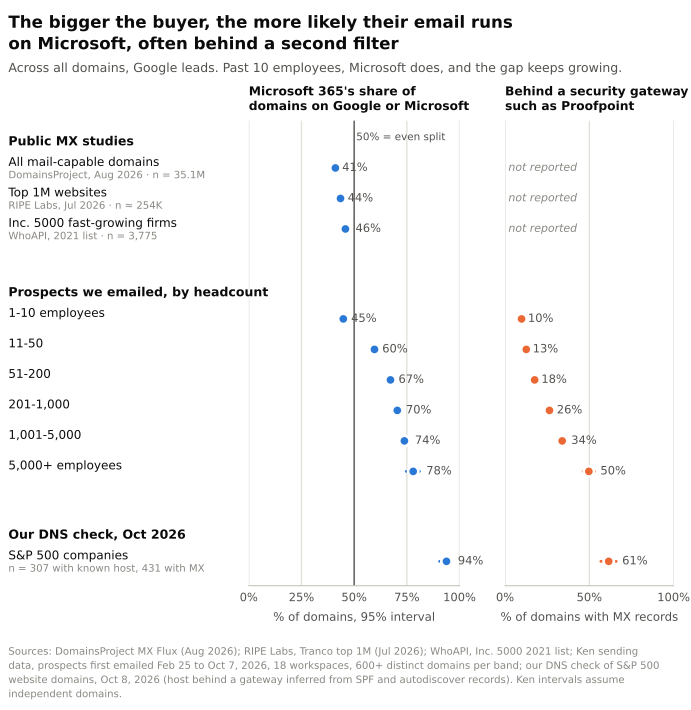 Source: DomainsProject (Aug 2026), RIPE Labs (Jul 2026), WhoAPI (Inc. 5000, 2021 list), Ken sending data (prospects first emailed Feb 25 to Oct 7, 2026, 18 workspaces, 600+ domains on Google or Microsoft per size band), and our DNS check of 452 S&P 500 domains (Oct 8, 2026). Lines show 95% confidence intervals.
We tagged every prospect we've emailed since late February 2026 by their domain's MX record, the DNS entry that says who handles a domain's email. Microsoft's share of the domains on Google or Microsoft went from 45% at 1-10 employees to 67% at 51-200 and 78% at 5,000+.
For the very top, we checked the mail records of 452 S&P 500 companies on October 8, 2026, using each company's website domain. Where we could tell the host, Microsoft ran 288 and Google ran 19.
Gateways grow with size too. A gateway is a filter like Proofpoint that reads mail before the mailbox does. They sat in front of 10% of the smallest companies' domains and half of the 5,000+ ones. Proofpoint alone fronted 212 of the 431 S&P 500 domains with a mail record. That second filter costs inbox space. In Validity's 2025 tests, mail to filtering companies like Proofpoint reached the inbox 79.0% of the time, against 83.0% at hosting platforms like Office 365 (Validity 2026 benchmark).
In our data, if you sell to companies with more than 50 people, at least two of every three prospects on Google or Microsoft are on Microsoft 365.
What happens to cold email sent to Microsoft 365?
Cold email to Microsoft 365 gets in. Then it goes quiet. We compared Microsoft 365 and Google Workspace prospects inside the same campaigns, so the copy, sender and timing matched. Each dot is an odds ratio. 1 means no difference, and 0.5 means Microsoft prospects had half the odds.
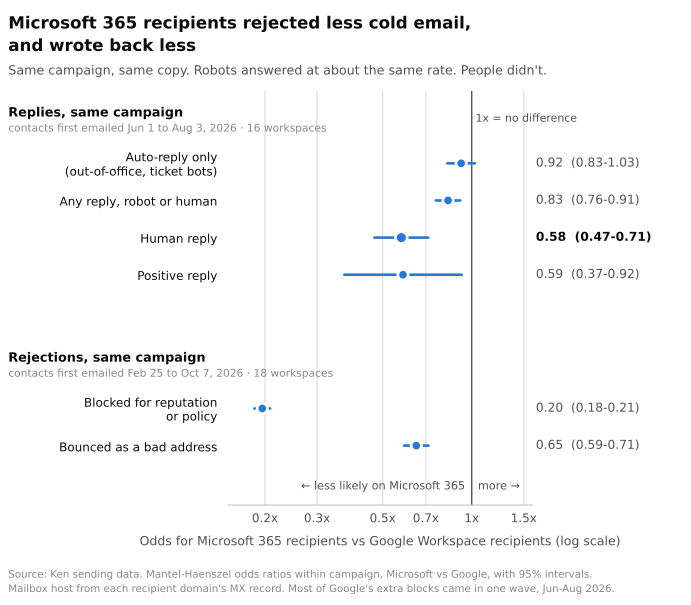 Source: Ken sending data. Replies: prospects first emailed Jun 1 to Aug 3, 2026, in 16 workspaces and 51 campaigns. Rejections: prospects first emailed Feb 25 to Oct 7, 2026, in 18 workspaces. Odds ratios within campaign with 95% confidence intervals.
- Microsoft blocked us less. Microsoft 365 prospects had about a fifth the odds of a reputation or policy block.
- The robots answered. Out-of-office replies and ticket bots came back at about Google's rate, so the mail arrived.
- The people didn't. The odds of a human reply were 42% lower. Google prospects replied more in 12 of the 15 campaigns big enough to compare.
- When a Microsoft prospect did answer, it was about half as likely to be a person.
That's what you'd expect if Microsoft accepts cold email and then files it where nobody reads it.
Is the Outlook reply gap real, or just bigger companies?
Microsoft shops skew bigger and more corporate, so maybe we measured company type, not filters. We tried to break the Outlook reply gap five ways. It held every time.
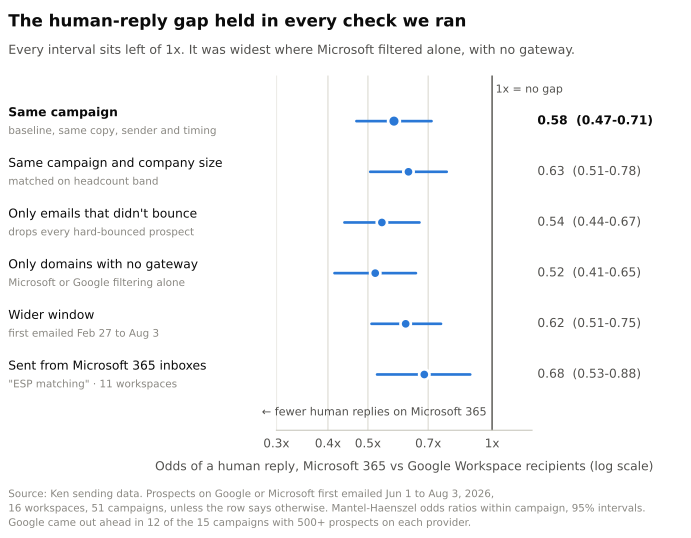 Source: Ken sending data. Prospects first emailed Jun 1 to Aug 3, 2026, in 16 workspaces and 51 campaigns, unless the row says otherwise. Odds ratios within campaign with 95% confidence intervals.
- Matching on company size shrank it only a little, to 37% lower odds.
- Dropping prospects whose email bounced made it bigger, 46% lower. Google's bounces aren't flattering Microsoft.
- Dropping domains behind a gateway made it biggest, 48% lower. The gap is widest where Microsoft's own filter works alone.
- A wider window, back to late February, gave 38% lower odds.
We can't see folders, so here's the honest read. The data fits a filter that quietly files cold email out of sight. Part of it may still be culture, since we matched on headcount, not on how a company feels about cold email. Treat it as a strong hint and test it on your own list.
The bounce side needs a date on it. Most of Google's extra blocks came in one wave, June to August 2026. In February, April and May, Google blocked less than Microsoft, and by September both bounced at about the same rate. Gateways are the bigger story for blocks. Microsoft mailboxes behind one blocked about 8.6 times as often as those without. Our cold email bounce rate guide covers what bounces do measure.
Does sending from Outlook inboxes help?
ESP matching, which emails Outlook prospects from Outlook inboxes, helps a little at best. Prospeo cites Winnr benchmarks of 92-95% inbox placement from Microsoft 365 to Outlook, against 84-87% from Google Workspace, with no sample size (Prospeo, checked October 2026).
In our data, the Outlook reply gap survived ESP matching. When the email came from Microsoft 365 inboxes, Microsoft prospects still had 32% lower odds of a human reply than Google prospects in the same campaign. That's the last row of the chart above. I'd match if your tool does it for free. I wouldn't count on it to fix Outlook.
Do Microsoft's 2025 sender rules apply to cold email?
Mostly no. Since May 5, 2025, domains sending more than 5,000 emails a day to Outlook.com accounts must pass SPF and DKIM and publish a DMARC record of at least p=none that lines up with one of them (Microsoft postmaster policies, checked October 2026). Senders that fail go to Junk and can bounce with 550 5.7.515.
Those rules cover personal addresses like outlook.com and hotmail.com. Of all the cold emails we sent from late February to early October 2026, none went to them, because we only email work addresses. Business mailboxes still check the same records, through what Microsoft calls composite authentication, or "compauth."
SNDS, the free reputation dashboard most guides tell you to set up, has the same blind spot. Microsoft pitches it as data to "improve your reputation at Outlook.com" (SNDS), and its complaint numbers count Hotmail and Windows Live users (SNDS FAQ, both checked October 2026). It won't show you how a 500-person company on Microsoft 365 filed your email. Their headers will.
How do you test where your cold email lands in Outlook?
- Split your list by mail host. Look up each domain's MX record.
mail.protection.outlook.commeans Microsoft 365 andgoogle.commeans Google.pphosted.com,mimecast.comandiphmx.comare the Proofpoint, Mimecast and Cisco gateways. Behind a gateway, an SPF record that includesspf.protection.outlook.comusually means Microsoft 365. - Track bounces and human replies per group. Quiet junk looks like a Microsoft group with few bounces, normal auto-replies and few humans.
- Test three real inboxes. Use personal Outlook.com, a Microsoft 365 business mailbox on the Strict preset, and Google Workspace, with your real setup and copy.
- Look again 48 hours later, after ZAP has had its chance.
- Read the headers on the Microsoft copy. In new Outlook or Outlook on the web, select More actions, then View, then View message details (Microsoft). Paste them into Microsoft's Message Header Analyzer.
Seed-test tools automate steps 3 and 4, but their inboxes run default settings. Your buyer's admin may not.
What do Outlook's headers tell you to fix?
| Header value | What it means | What to fix |
|---|---|---|
compauth=fail reason=001 | Microsoft couldn't tie the email to your From domain, and your records are missing or weak | Sign with DKIM on your From domain and publish DMARC |
compauth=fail reason=000 | DMARC failed, and your own DMARC policy says quarantine or reject | Make SPF or DKIM line up with your From domain |
CAT:BULK, SRV:BULK or a high BCL | You look like a bulk sender people complain about | Send less per inbox, target tighter, write one-to-one |
CAT:SPM or SFV:SPM | The spam filter flagged the message | Check reputation and content: new domains, volume jumps, links |
SFV:BLK | This person put you on their Blocked Senders list | Remove them for good |
SFTY:9.25 | Outlook showed its first-contact safety tip | Usually nothing. It shows on a first email from a new sender |
Source: Microsoft's anti-spam header reference, checked October 2026.
How do you get cold email out of Outlook junk?
In the order I'd do it:
- Pass compauth. DKIM-sign with your From domain and publish DMARC. p=none is fine to start. You want
compauth=passwith a reason code in the 100s. - Lower your bulk score. BCL tracks complaints, so send fewer emails per inbox to a tighter list, with copy written for one person. I'd also drop the tracking pixel. Here's why we turned open tracking off.
- Protect your sending reputation. Use separate sending domains, warm them up, and keep volume steady. If you hit 550 5.7.606, fix the cause before you ask for delisting.
- Treat enterprise as its own segment. Half of the 5,000+ employee domains we emailed sit behind a gateway. Send slower there.
- Measure by provider every month. One blended reply rate hides the Microsoft problem.
Ken runs cold email and LinkedIn outreach for B2B companies, done for you, on infrastructure we own, with our own SMTP servers, dedicated US and EU IPs and live monitoring. Your main domain never sends. More in our cold email deliverability guide.
Frequently asked questions
Is an SCL of 5 the reason my email went to junk?
Probably not on its own. In Microsoft 365 cloud mailboxes, Microsoft says SCL no longer decides the verdict or the action. Check the CAT field in the X-Forefront-Antispam-Report header to see which filter acted.
Does it help if a prospect marks my email "Not junk"?
It rescues that one email. If they also add you to their Safe Senders list, your future mail skips spam filtering in their mailbox. That list is personal, so their coworkers don't get the same pass.
How long does it take to get off Microsoft's blocked senders list?
After a request at sender.office.com, Microsoft says removal can take 24 hours or longer. If the bounce says 5.7.511, email [email protected] with the bounce instead, and Microsoft says it will reply within 48 hours.
Will Microsoft's new Promotions folder catch cold email?
Only mail Microsoft tags as bulk, and only where an admin turned on "Bulk moves," which is off in the Standard and Strict presets. The folder learns when people move mail in or out, so a prospect who drags you back to the inbox helps your next email.
Should I stop emailing Microsoft 365 prospects?
No. Above 50 employees they're most of your market. Split them out, send slower, and judge them on human replies, not bounces.
The short version
Outlook junk isn't one filter. It's a stack, and the fix depends on which layer caught you. Split your list by mail host, test on a real Microsoft 365 mailbox and read the headers. If you'd rather hand it off, your first campaign with us is free.