
Can You Use HubSpot Sequences for Cold Email? Not on Your Main Domain
Technically yes, but not from your main domain. HubSpot sequences send from your own inbox. Limits, policy, the spam blind spot and a safe setup.
HubSpot lets one sales rep send 500 sequence emails a day from their own inbox. This summer, the busiest inbox we used for cold email sent 51 in a single day.
Technically yes, you can send cold email with HubSpot sequences, but not safely from your main domain. Sequences go out through your own Gmail or Outlook inbox, so every spam click lands on the domain your customers, invoices and newsletters depend on. HubSpot's Anti-Spam Policy also asks for consent from every recipient. If you use sequences for cold outreach, send from a separate, warmed domain at low volume. For real volume, keep HubSpot as the CRM and send cold email from a setup built for it.
Most guides stop at "use a separate domain." They skip three things:
- You can't see the number HubSpot tells you to watch. HubSpot's policy wants spam complaints under 0.1%. Its sequence reports don't show complaints, and Google's free dashboard watches personal Gmail, which B2B cold lists almost never touch.
- The cap is a ceiling, not a safe speed. 500 a day from one inbox is 100 times what our median cold inbox sends.
- HubSpot's own scorecard is built for warm email. It calls a 7% to 13% reply rate "good." None of the published cold email averages we checked gets there.
HubSpot's sequence limit tells you how much you're allowed to send, not how much your domain can take.
How do HubSpot sequences send email?
HubSpot sequences send from the inbox you connect, not from HubSpot's marketing servers. Connecting Gmail or Outlook gives HubSpot "permission to send emails to your contacts using your company's email servers," per HubSpot's inbox guide (checked October 2026). A sequence email looks like one you typed yourself, on your own domain.
That's why sequences feel personal. It's also the whole risk. Everything your domain sends shares one reputation, including invoices, support replies, and your HubSpot newsletters if you've connected your domain to them. Google's sender guidelines say "Over time, user spam reports can lower your domain's reputation."
Sequences need an assigned Sales Hub or Service Hub seat on Professional or Enterprise, per HubSpot's sequences guide. The product catalog lists Sales Hub Professional from $100 per seat a month plus a $1,500 onboarding fee (checked October 2026).
What are HubSpot's sequence limits?
HubSpot sequence limits are set per seat and counted over a rolling 24 hours. Your email provider's own limits still apply on top.
| Limit | Number | What happens when you hit it |
|---|---|---|
| Sequences on Free or Starter | Not included | You can't build sequences |
| Sequence emails, Professional seat | 500 a day per user | Yellow warning near the limit, then a red error. You pick another send day. |
| Sequence emails, Enterprise seat | 1,000 a day per user | Same as above |
| Bulk enrollment speed | 3 emails a minute | Sending is paced. 500 first emails take almost 3 hours. |
| Custom limit per connected inbox | Under 1,000 a day, up to 10 a minute | Overrides the seat limit |
| Google Workspace user | 2,000 messages a day, 500 on a trial | Sending stops for up to 24 hours. Receiving still works. |
| Microsoft 365 mailbox | 10,000 recipients a day, 30 messages a minute | Sending stops until the 24-hour count drops |
Sources, checked October 2026: HubSpot send limits, custom limits and sequences; Google Workspace sending limits; Microsoft Exchange Online limits.
One detail changes the math. The 500 counts every sequence email, including follow-ups scheduled from earlier enrollments, and HubSpot checks it "24 hours forwards and 24 hours backwards." So 500 a day isn't 500 new prospects a day. With a 4-step sequence, a Professional seat running flat out reaches about 125 new people a day. With 3 steps, about 167.
How many cold emails can one primary-domain inbox send before risk climbs?
Far fewer than HubSpot allows. Even on a spare, warmed domain, public guides put a cold inbox at about 20 to 50 cold emails a day, as our post on cold emails per inbox per day shows. We run lower. Across every inbox-day this summer, our median sending inbox sent 5 cold emails. Nine in ten inbox-days stayed at 13 or fewer, and 99% at 39 or fewer. The busiest single inbox-day was 51.
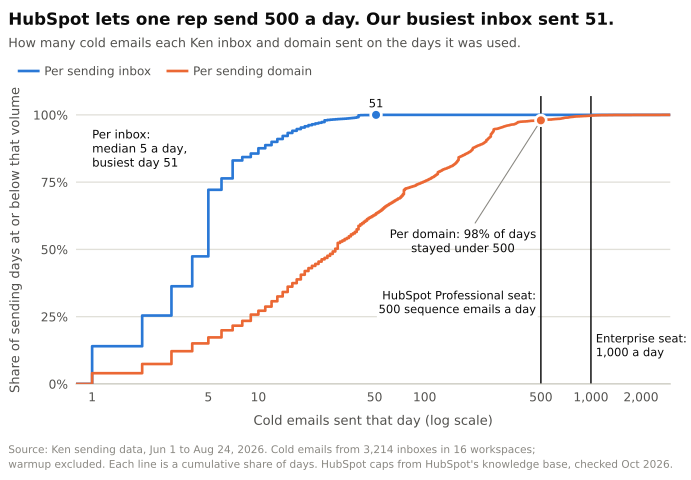 Source: Ken sending data, every cold email sent Jun 1 to Aug 24, 2026, from 3,214 inboxes in 16 workspaces. Warmup excluded. HubSpot limits checked October 2026.
Domains tell the same story. 98% of our sending-domain days stayed under 500 cold emails, and those are spare domains built to take hits. On days a workspace sent 500 to 999 cold emails, it spread them across a median of about 145 inboxes on 4 domains, roughly 5 emails per inbox. HubSpot lets one rep put 500 on a single inbox, on the one domain you can't replace.
Two things make it riskier on a main domain.
Volume jumps. Google warns that "immediately doubling previously sent volumes suddenly could result in rate limiting or reputation drops." Say your 10-person team sends 300 emails a day. One rep at the HubSpot cap adds 500, close to tripling your domain's volume overnight.
The spam-report budget. HubSpot's Anti-Spam Policy asks for spam complaint rates under 0.1%. Google asks senders to stay under 0.1% too and never to reach 0.3%. At 0.1%, you get 1 report per 1,000 emails.
| Cold emails a day | Per 5-day week | Max spam reports a week at 0.1% | At Google's 0.3% red line |
|---|---|---|---|
| 30 | 150 | 0.15 (1 every 7 weeks) | 0.45 |
| 100 | 500 | 0.5 | 1.5 |
| 500 (Professional cap) | 2,500 | 2.5 | 7.5 |
| 1,000 (Enterprise cap) | 5,000 | 5 | 15 |
A rep at the Professional cap gets one spam click every two days before crossing HubSpot's line. And that rep won't hear about any of them. A prospect who replies "please remove me" lands in your inbox. A prospect who clicks "report spam" doesn't.
I'd keep cold email from a primary domain close to zero. A founder writing 10 hand-picked emails a day from their own inbox is fine. A sequence enrolling 125 strangers a day is not.
Can you see when a HubSpot sequence is hurting your domain?
Mostly no, and none of the top guides we read mention it. When a prospect clicks "report spam," the report goes to their email provider, not to you. For B2B cold email, the usual places to look come up empty:
- HubSpot sequence reports show reply, meeting, open, click, bounce and unsubscribe rates. HubSpot's reporting guide lists no spam complaint metric.
- Google Postmaster Tools reports spam rate on mail "sent to Gmail accounts" (Google). Google's sender FAQ is blunter: its sender guidelines "don't apply to messages sent to Google Workspace accounts." Company addresses on Google are Workspace accounts.
- Microsoft SNDS covers mail to Outlook.com, Microsoft's free consumer email, and only for "the IPs for which you are responsible" (Microsoft). Sequence emails leave from Google's or Microsoft's servers, not from IPs you control.
B2B cold lists are company addresses, so they fall straight into that gap. Of all the cold emails we sent from late February to early October 2026, none went to @gmail.com addresses. We only target work addresses, so that zero is by design, but any list built from work emails looks the same. 53% went to companies on Microsoft 365 and 34% to companies on Google Workspace.
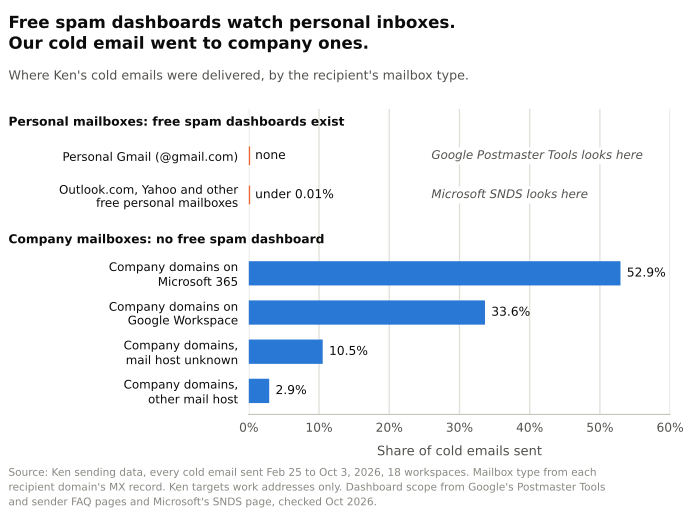 Source: Ken sending data, every cold email sent Feb 25 to Oct 3, 2026, 18 workspaces. Mailbox type from each recipient domain's MX record. Dashboard scope from Google and Microsoft help pages, checked October 2026.
So the first warning usually comes sideways. Replies dry up, or a customer says your invoice landed in junk. On a spare domain, that's a nuisance. On your main domain, it hits every email your company sends.
Bounces do show up, and HubSpot's sender score wants them under 3%. But a bounce isn't always a bad address. Of the hard bounces on our sending domains over the same months, 59% were spam, reputation or policy blocks, and only 21% were bad addresses. A block is a mail server refusing your domain, and you want those landing on a domain you can afford to lose.
Does HubSpot's policy allow cold email through sequences?
HubSpot's policies don't mention sequences or cold email by name, but they read strict. The Acceptable Use Policy, last modified September 16, 2026, says "You may not use HubSpot to send spam" and points to the Anti-Spam Policy, last modified February 2, 2026. That policy's definition of spam has two parts that matter here:
- "unsolicited bulk messages sent to recipients who have not provided verifiable, explicit consent"
- "unsolicited commercial messages or one-to-one commercial communications that violate applicable anti-spam laws"
A sequence sits between the two. Each email goes out one at a time, from a real person's inbox. But 125 strangers a day on autopilot looks a lot like bulk.
The rest of the Anti-Spam Policy leans the same way:
- It says "Messages sent through HubSpot Services must be sent only to recipients who have: (i) provided express, verifiable consent to receive such communications," along with a documented opt-in.
- It bans contacting people from "purchased, rented, borrowed, or other third-party lists, including email append services or enrichment services lists in violation of applicable laws or third-party terms."
- It asks for "bounce rates below 5%" and "spam complaint rates below 0.1%."
- It warns that violations "may result in warning, temporary restriction, suspension, account termination."
The policy doesn't carve out email sent through your connected Gmail, and HubSpot's sales automation page pitches sequences for "prospects based on intent signals" without ever mentioning cold outreach. My read is that sequences are meant for people who already know you. If you plan to enroll a bought or enriched list, get HubSpot's answer in writing first. What the law allows in your market is a separate question, covered in our guide to cold email opt-out rules.
What does HubSpot's sender score say about cold email?
HubSpot's sequence sender score shows what sequences were built for. The score mixes reply rate and bounce rate, and HubSpot's help page says "A good reply rate is between 7% and 13%." That's warm email territory.
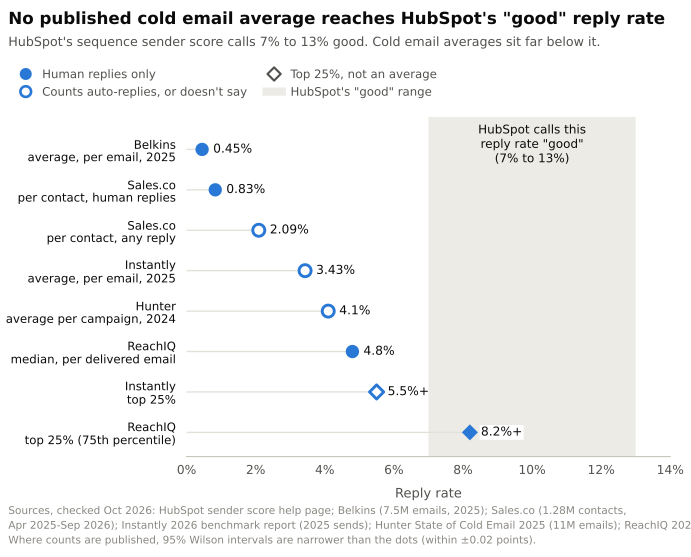 Sources: HubSpot sender score page; Belkins (7.5M emails, 2025), Sales.co (1.28M contacts, 2025-26), Instantly (2025 sends), Hunter (11M emails, 2024) and ReachIQ (2026), checked October 2026. Diamonds mark top-quartile figures, not averages.
Cold email benchmarks sit far lower. They also disagree with each other, because each counts replies differently, which our post on what a good cold email reply rate is untangles. Belkins measured 0.45% across 7.5 million emails in 2025, with auto-replies removed. ReachIQ's median campaign gets 4.8%, and only its top quarter, at 8.2% and up, reaches HubSpot's band.
So a cold sequence will almost always score low inside HubSpot. Read that score as a warm-email yardstick, not a verdict on your cold campaign.
What's the safe setup if you still want to use HubSpot sequences?
If your volume is small and you want everything inside HubSpot, here's the setup I'd use:
- Buy a separate domain that looks like yours, say getacme.com for acme.com, and create 1 to 3 inboxes on it. Set up SPF, DKIM and DMARC, the DNS records that prove those inboxes are allowed to send for that domain.
- Warm the inboxes for 2 to 4 weeks before any cold email. HubSpot won't do it for you. Our warmup guide covers private vs pooled warmup.
- Connect them as extra work inboxes. HubSpot lets one user connect several, and you pick the From address when you enroll. HubSpot's enrollment guide describes one From address per enrollment and no rotation, so split enrollments across inboxes by hand.
- Set a custom daily limit of about 30 per inbox. Anyone with Account Access permission on Professional or Enterprise can set it, and it overrides the 500 seat cap.
- Turn the unsubscribe link on. HubSpot only switches it on by default for accounts created after September 4, 2024, per its unsubscribe guide, so older accounts should check.
- Verify every address before enrolling, and pause if bounces pass 3%.
- Only enroll people you can defend under HubSpot's policy and your local law.
Three inboxes at 30 a day is 90 cold emails, about 30 new people a day on a 3-step sequence. That's useful for a founder, and about as much as this setup should carry.
When should you keep HubSpot as the CRM and send cold email elsewhere?
Move cold sending out of HubSpot when you want more than a couple of inboxes' worth a day, more than one person sending, or any list you didn't collect yourself. HubSpot stays the system of record either way. Only replies and booked meetings need to land in it.
| HubSpot sequences | Dedicated cold email setup | |
|---|---|---|
| Sends from | Your connected inbox, usually your main domain | Separate domains and inboxes |
| Daily cap | 500 or 1,000 per seat | Set by inbox count and warmup |
| Spreading volume | One From address per enrollment | Many inboxes, rotated |
| Warmup | Not included | Usually included |
| Spam complaints | Not in sequence reports | Hard to see anywhere, but the damage stays off your main domain |
| Best for | Inbound leads, event contacts, open deals | First conversations with people who don't know you yet |
That can be a tool you run yourself or a service. Ken runs cold email and LinkedIn outreach for B2B companies, done for you, on infrastructure we own. We warm new domains for 2 to 4 weeks and never send from your primary domain. A human approves every campaign before the first email goes out.
Frequently asked questions
Can HubSpot raise the 500-a-day sequence limit?
Not in any way HubSpot documents. The limit is 500 a day per Professional seat and 1,000 per Enterprise seat. HubSpot says trial accounts don't get more, and the custom setting for connected inboxes only goes below 1,000 a day.
Do out-of-office replies stop a HubSpot sequence?
Usually not. HubSpot's unenrollment guide keeps contacts enrolled after most auto-replies, but Gmail out-of-office replies sent to Outlook inboxes "aren't recognized," so those contacts get unenrolled as if they had replied. That bites in summer. Of the contacts we first emailed between June 1 and August 3, 2026 who replied at all, 4 in 5 sent only an auto-reply.
Can a whole team share one inbox for sequences?
No. HubSpot's inbox guide says a connected inbox "should be unique to your user and not used by anyone else on your team," and a team address connected to the conversations inbox can't send sequence emails. Each rep sends from their own connected inbox, under their own seat limit.
Will cold sequences hurt my HubSpot marketing emails?
They can if both use the same domain, because Google scores the domain, not the tool that sent the email. Sending cold sequences from a separate domain keeps your newsletters out of it.
The bottom line
HubSpot is a great place to keep your pipeline and a risky place to start cold conversations. Send cold email from domains you can afford to lose, and let HubSpot hold the replies. If you'd rather not build that yourself, your first campaign with Ken is free.