
Google Workspace Suspended My Account for Cold Email. Now What?
A sending-limit block lifts within 24 hours. A Gmail suspension needs a secured account and an admin restore, and Google allows only 5 a year per inbox.
Google lets an admin restore the same suspended Gmail account five times a year. After the fifth, nobody can bring it back early, not even Google Support.
So first, work out which problem you have. If Gmail says you "reached a limit for sending email," or your tool logs "550 5.4.5 Daily user sending limit exceeded," stop and wait, because that block lifts on its own within 24 hours. If the Admin console says the user is suspended, an admin has to secure the account, fix the cause and click Reactivate. A suspension for breaking Google's Terms of Service is final.
Most guides stop there. They skip four things that change what you should do next.
- Google treats a spamming user as a possible hacked account. Its "User suspended for spamming" alert fires on "suspicious activity that suggests an account compromise, such as evidence that a user is sending spam." So the fix starts with security, not a support ticket.
- Restores run out. After five in a calendar year, every new suspension means a forced 24-hour wait.
- A new account's real cap is probably 500 emails a day, not 2,000. A small account can stay there for over a year.
- Leaving Workspace doesn't get you away from Gmail. Of the prospects we emailed last quarter, 38% read their company mail on Google. At companies of 10 or fewer, 48% did.
If you keep one line, keep this one. A Workspace spam suspension isn't a fine for crossing a number. Google treats it as a possible break-in, and lets an admin undo it only five times a year per inbox.
Is it a sending limit or a real suspension?
Find your message below. Everything in this table comes from Google's help pages on sending limits, restoring Gmail, restoring users, bandwidth, relay spam and error codes, all checked October 2026.
| What you see | What it means | How long | What to do |
|---|---|---|---|
| "You have reached a limit for sending email" | You hit a daily cap, such as 2,000 messages, or 500 on a trial | Up to 24 hours, on a rolling clock | Stop and wait. Incoming mail still works. |
| "550 5.4.5 Daily user sending limit exceeded" | The same cap, reported to your sending tool | Up to 24 hours | Pause the tool so it stops retrying. |
| Admin console: Gmail suspended for limits or possible spam | Gmail is off for that user. No sending or receiving. | Until an admin reactivates. Mail is back within 15 minutes. | Fix the cause, then reactivate. Five restores a year. |
| "Automatically suspended: Unverified sign-in" | Suspected spam, or many accounts created at once | Until the user passes a check | The user signs in at accounts.google.com and clears a CAPTCHA or a phone code. |
| "Automatically suspended: The user might be at risk" | A suspicious sign-in | Until an admin reactivates | Secure the account, then reactivate. |
| Sign-in error after heavy syncing | Bandwidth limit, often from apps syncing the inbox | Usually 1 hour, up to 24 | Disconnect extra apps. |
| "550 5.7.0 Email relay denied... suspended due to abuse" | Spam kept going out through Google's SMTP relay service for 24 hours | Until you stop the source and restore | Find what's sending, stop it, then restore. |
| "Automatically suspended: Didn't follow Google Terms of Service" | Abuse or a Terms of Service breach | Permanent | Google says neither admins nor support can restore it. |
A second group of errors isn't about your account at all. These bounces come from Gmail on your prospect's side, whatever you send from.
| Bounce | What it means |
|---|---|
| "421 4.7.28 Gmail has detected an unusual rate of unsolicited email" | Gmail is slowing mail from your IP, domain or a link. It's temporary. Send less. |
| "550 5.7.1 ... very low reputation of the sending domain" | Gmail blocked you because your domain's reputation is too low. |
| "550 5.7.26 ... the sender is unauthenticated" | SPF and DKIM, the DNS records that prove you're allowed to send for your domain, aren't passing. |
| "550 5.1.1 The email account that you tried to reach does not exist" | Bad address. That's a list problem, covered in our guide to cold email bounce rates. |
How do I get a suspended Workspace account back?
Go in this order. Reactivating before you fix the cause is how people burn through their five restores.
- Stop all sending from the inbox. Pause every sequence and the warmup tool. Restarting the same pattern right after a restore tells Google nothing changed.
- Read the exact reason. In the Admin console, open Directory, then Users, then the user. Google shows the reason at the top of the page.
- Secure the account. Google treats spam as a sign of a break-in, so act like it was one. Change the password, sign out all sessions, turn on 2-Step Verification, and remove app passwords and connected apps you don't recognize.
- Reactivate. Click Reactivate on the user's page. If the button isn't there, wait up to 24 hours for the limits to reset.
- Restart slowly. Go back at a fraction of your old volume and watch bounces and replies for a week. Our post on how many cold emails you can send per day covers the volume side.
Two costs people forget. While Gmail is suspended, the user can't receive mail, so replies to your campaign never arrive. And on the Flexible Plan, "suspended users are charged at the same rate as active users," per Google's billing page. You pay for an inbox that can't send or receive.
Can I appeal a Google Workspace suspension?
It depends on what got suspended.
One user, for breaking the Terms of Service. Google says these accounts "can't be restored by a Google administrator or Google Workspace support." I'd write that inbox off and spend the energy on finding out why it happened.
The whole organization. Google's spam and abuse policy says that if the problem is domain-wide, Google can "suspend the entire account and deny administrator access to all the Google Workspace services." The notice goes to the admin's secondary email address, so make sure a human reads that inbox.
Google's developer docs show something the top guides miss. The Alert Center tracks account suspensions in four states: warning, suspended, appeal submitted and appeal approved. A warning comes with an appeal window, "the amount of time remaining to appeal an imminent suspension," and spam is one of the listed reasons. When the window closes, the suspension starts. A warning is the cheapest moment to appeal.
Write the appeal like a person. Say what you sent, how much, and to whom, then what you've already changed. Never claim you weren't sending cold email when you were.
And don't spin up fresh accounts to dodge a ban. Google's account policies say "Don't create or use multiple accounts to break Google's policies."
Why did I hit the limit after only 500 emails?
Because new accounts don't start at 2,000. Google lists 500 messages a day and 500 outside recipients a day for trial accounts, and it doesn't raise them during the trial. Paying doesn't fix that right away either. Google says limits rise once your domain "has cumulatively paid at least $100 USD," and "it can take up to 75 days after meeting this payment threshold." If you bought your domain from Google, you need the domain's cost plus $100.
Google doesn't spell out the cap between the end of the trial and the $100 mark. But it ties the raise to money paid, not to the end of the trial.
For a small account, $100 takes a while. As of October 2026, Business Starter on the Flexible Plan costs $8.40 per user a month, billed at the start of the following month, after a 14-day free trial. Here's the math for an account that signs up on October 1, 2026.
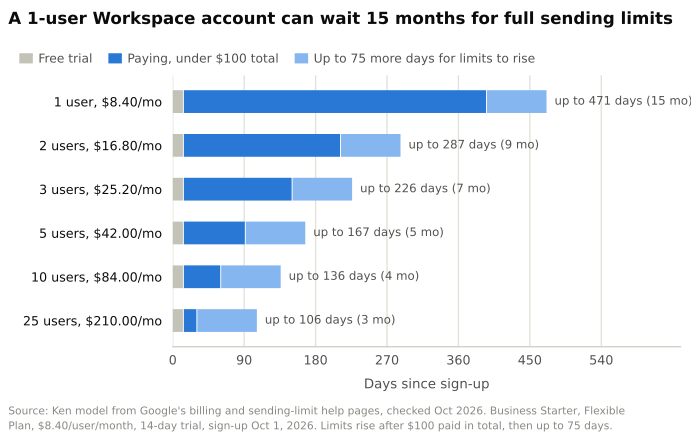 Source: Ken model from Google's billing and sending-limit help pages, checked October 2026. Business Starter, Flexible Plan, $8.40 per user per month, 14-day trial, sign-up October 1, 2026. Ignores early mid-month charges, which could only move the $100 date sooner.
One inbox crosses $100 on its 13th monthly bill, in November 2027. Add Google's 75 days and it can sit on trial caps for up to 471 days. Three inboxes on one account wait up to 226 days. Even 25 inboxes wait up to 106.
So if a new inbox hit a wall at 500, you probably weren't flagged. You're likely just on the cap Google gives new accounts.
What gets Workspace accounts suspended for cold email?
Google doesn't publish a trigger number. Its own rules point to five causes.
- People reporting you. Google monitors abuse@ and postmaster@ "for every domain registered with Google Workspace." So an annoyed prospect can report you to Google by writing to abuse@ at your own domain.
- Spam complaints. Every "report spam" click tells Google your mail is unwanted. Google's sender guidelines say to keep your spam rate under 0.1% and never reach 0.3%, which is 3 complaints per 1,000 emails. Google doesn't publish a number for Workspace senders, so I'd treat 0.3% as the outer edge.
- Creating many accounts at once. That alone can trigger "Unverified sign-in."
- Logins that look like a stranger. When several tools log in to one inbox from different servers, it can look like the suspicious sign-ins Google suspends for.
- Too many syncing tools. IMAP is the way email apps download your inbox. Google caps IMAP downloads at 2,500 MB a day and warns that each extra IMAP app downloads every message again. A sequencer, a warmup tool and a CRM sync on one inbox add up fast.
Then there's the rule almost nobody quotes. Google's acceptable use policy for Workspace, last modified October 13, 2025, bans using it "to generate, distribute, publish or facilitate unsolicited mass email." Gmail's program policies add that "your definition of 'unsolicited' or 'unwanted' mail may differ from your email recipients' perception." Cold email from Workspace runs on Google's tolerance.
To stay under the radar, keep volume per inbox low and steady, warm new inboxes for a few weeks, verify every list, put a working opt-out in every email, and connect one sending tool per inbox through Google sign-in instead of app passwords. Our warmup guide walks through the first four weeks.
Does leaving Google Workspace get you out of Google's reach?
Your account, yes. Your emails, no.
We checked our own sending to see how much of a cold email list Google really runs. We took every prospect Ken emailed in real campaigns from July to September 2026, across 17 workspaces including our own, and looked up who hosts each company's email. That's in the domain's MX record, the public DNS entry that says where its mail goes. To test our stored records, we looked up a random 2,000 again, live. 95% matched.
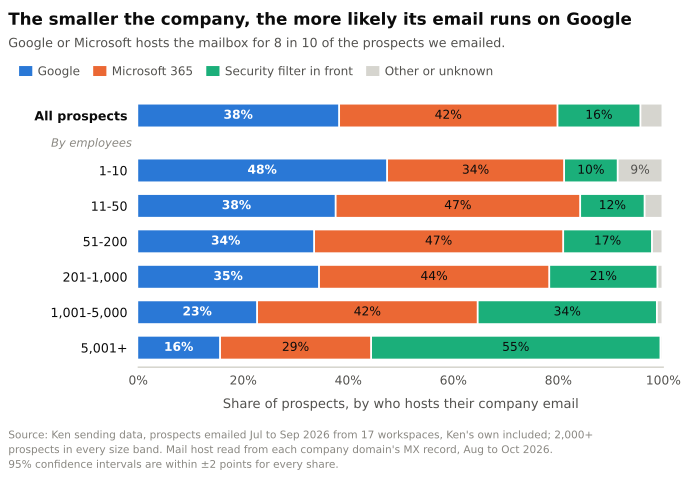 Source: Ken sending data, prospects emailed July to September 2026 from 17 workspaces including Ken's own, 2,000+ prospects in every size band. Mail hosts read from MX records, August to October 2026. 95% confidence intervals are within 2 points for every share.
Two companies run most inboxes. Google hosts the mailbox for 38% of prospects and Microsoft 365 for 42%. Another 16% sit behind a security filter like Proofpoint or Mimecast, and almost two thirds of those pass the mail on to Microsoft or Google. Count them, and Microsoft runs about half of all inboxes and Google about 4 in 10, so the two run about 9 in 10 between them.
The smaller the company, the more Google matters. At companies of 1 to 10 people, 48% of prospects read their mail on Google. Over 5,000 people, it's 16%, and more than half put a security filter in front. The same slope showed up inside each of our three biggest workspaces, so it isn't just a mix of different clients.
Your list matters more than our average. Across the 14 workspaces that emailed at least 1,000 prospects, Google's share ran from under 5% to 72%. Google plus Microsoft, counting mail behind filters, never dropped below 85%.
So leaving Workspace takes your account out of Google's hands. It doesn't take your emails out of Gmail's filters. If you sell to founders and small teams, about half your prospects will read you in Gmail.
One wrinkle most guides miss. Google's sender FAQ says its sender guidelines "don't apply to messages sent to Google Workspace accounts," and that is where your B2B prospects on Google live. Their inboxes still run on Gmail. Google just doesn't publish the rules it uses to filter them, so no number makes you safe.
Why does Ken send from its own servers?
Ken runs cold email and LinkedIn outreach for B2B companies, done for you, on infrastructure we own. We send from our own mail servers with dedicated US and EU IPs, and we add some Gmail and Outlook inboxes for diversification. New domains warm up for 2 to 4 weeks, your main domain never sends, and a person approves every campaign before the first email goes out.
Google's acceptable use policy rules out "unsolicited mass email," and Microsoft's Exchange Online limits tell anyone who needs "to send legitimate bulk commercial email" to "use third-party providers that specialize in these services." Both products are built for a team's everyday mail, and they're right to protect it.
Owning the servers changes who holds the off switch. On our own servers, Google can't lock the mailbox, because the mailbox isn't Google's. The Gmail and Outlook inboxes we add play by Google's and Microsoft's rules like anyone else's. Either way, Gmail still filters what we send, and it should. The quality bar doesn't move. The setup under it does. The full setup is in our cold email deliverability guide.
Frequently asked questions
How long does a Google Workspace suspension last?
A sending-limit block lasts up to 24 hours, and a bandwidth block usually about 1 hour. A Gmail suspension lasts until an admin reactivates it, or a forced 24 hours once the five yearly restores are used up. A Terms of Service suspension is permanent.
Is Microsoft 365 any safer for cold email?
Not really. Microsoft caps each mailbox at 10,000 recipients a day and says Exchange Online "isn't suited to accommodate bulk-mailing scenarios." The rules differ, but the message is the same as Google's.
Will a suspension hurt my domain's reputation?
The suspension is a symptom. The spam behind it is what hurts. Google's relay policy says "sending large amounts of spam can damage your domain's reputation," so your other mail from that domain can start landing in spam too.
What if it's a personal gmail.com account?
That's a different process. Sign in on a browser and select "Start Appeal." Google's disabled account page says that for some violations it reviews up to 2 appeals and closes any after that.
The short version
Find your exact message first. A sending-limit block clears within 24 hours, a Gmail suspension needs a secured account and a careful restore, and a Terms of Service suspension is final. If you'd rather not run cold email on someone else's mailbox at all, your first campaign with us is free.